
Vitark in ChatGPT
ChatGPT, with the record open.
On its own, ChatGPT answers from memory and can invent cases. With Vitark, it searches real Indian judgments and statutes and shows the source ID for each one, so you can check it.
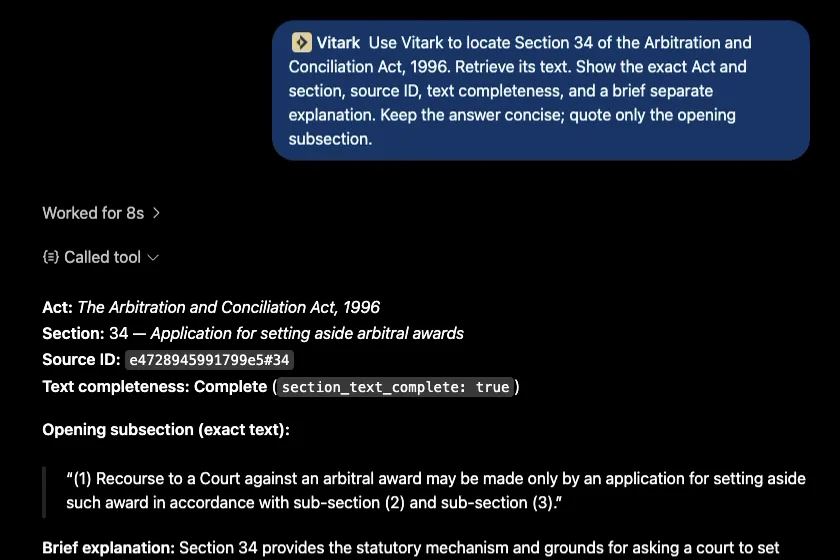
Ask for a case by CNR, citation or party names, or name the Act and section. ChatGPT answers from the text Vitark retrieves and gives the source ID for each one, so you can check it.
 Add Vitark to ChatGPT
Uses your Vitark account and credits. Checking your balance is free.

What Vitark adds to ChatGPT.
- Real judgments, not memory. ChatGPT answers from the judgments Vitark returns and lists each one with its source ID.
- The statute, word for word. Name the Act and section to get the text of the provision itself.
- It says when text is partial. Long judgments can arrive in part. The answer says when the text is incomplete, so ask for the rest before quoting.
- Research, not advice. Vitark shows what courts have held. For advice on your own matter, consult a qualified advocate.
Watch Vitark working in ChatGPT.
Under four minutes, from adding the plugin to reading a judgment.
Chapters
- Search the public plugin marketplace
- Open Vitark and start a chat
- Choose Vitark for the task
- Check available research credits
- Ask a focused legal question
- Find a specific judgment
- Ground the answer in the judgment
- Read a specific provision
- Find a judge in the index
- Continue the research
- Inspect the available citation links
- Keep the conversation sourced
Read the full video transcript
Search the public plugin marketplace
Start in the ChatGPT plugin marketplace. Search for Vitark, then open the public listing with the gold and navy logo. Vitark brings Indian legal research into your conversation.
Open Vitark and start a chat
This is the public Vitark plugin. Review its description and available tools, then choose Try in chat. The official plugin is already installed and connected in this account.
Choose Vitark for the task
Vitark is now selected in the conversation. Ask for the legal issue, court, or document you need in plain language. ChatGPT uses the connected research tools to help with the task.
Check available research credits
Your available research credits appear here. Checking the balance is free. Research uses the same account balance as the main application.
Ask a focused legal question
Start with a focused question and add the court or date range that matters. Vitark searches its legal sources, and ChatGPT organizes the returned material into an answer. Waiting periods are shortened in this walkthrough.
Find a specific judgment
When you know the case, ask for it by party name, citation, or case identifier. Review the matching records before moving into the judgment itself.
Ground the answer in the judgment
Ask a follow-up about the reasoning in the judgment. Vitark retrieves the source text so the answer can refer to the record. Check any retrieval limits before relying on a quotation or conclusion.
Read a specific provision
You can also name an Act and section. Keep the statutory text separate from the case-law explanation, and use the returned source identifiers to follow the material.
Find a judge in the index
Resolve a judge’s name against the legal research index. Review the matched name, the indexed case count, and the coverage notes. Name suggestions help you make the next research question more precise.
Continue the research
Explore related cases using Vitark. Review the source identifiers and the limits of the results. Similarity and citation links help you investigate, but they do not establish how a later court treated a judgment.
Inspect the available citation links
Explore the citations attached to a judgment. Keep the cases it cites separate from possible later citing cases, and review the coverage notes. Read the linked judgments before drawing conclusions about later treatment.
Keep the conversation sourced
From a legal question to a judgment and a statutory provision, Vitark brings source-based research into your ChatGPT conversation.